PDF sample-chase-statement.pdf
Bank Statement Presets
Chase USD Bank of America USD Wells Fargo USD Revolut EUR HSBC GBP Barclays GBPExtract a transaction table from Chase, Bank of America, Wells Fargo, Revolut, and other bank PDFs in this browser. The file stays on your computer. No account required.
Drop a bank statement PDF here
Digital PDFs, password-protected statements & scans — parsed in your browser.
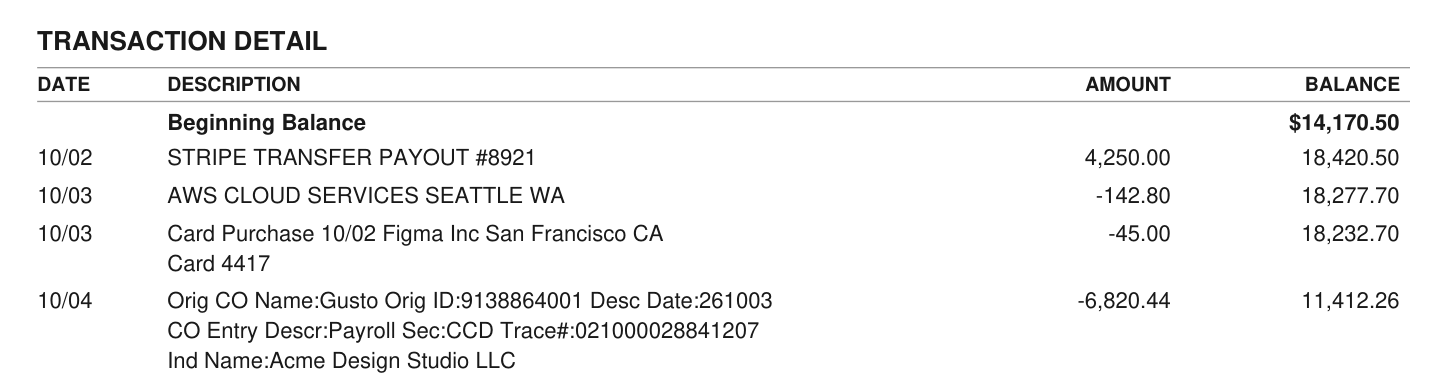
Example output · Sample Chase statement
In this browser
| Row | Date | Description | Amount | Balance | Check |
|---|---|---|---|---|---|
| 1 | 2026-10-02 | STRIPE TRANSFER PAYOUT #8921 | 4,250.00 | 18,420.50 | OK |
| 2 | 2026-10-03 | AWS CLOUD SERVICES SEATTLE WA | -142.80 | 18,277.70 | OK |
| 3 | 2026-10-03 | Card Purchase 10/02 Figma Inc San Francisco CA Card 4417 | -45.00 | 18,232.70 | OK |
| 4 | 2026-10-04 | Orig CO Name:Gusto Orig ID:9138864001 Desc Date:261003 CO Entry Descr:Payroll Sec:CCD Trace#:021000028841207 Ind Name:Acme Design Studio LLC | -6,820.44 | 11,412.26 | OK |
Money in is a Credit. Money out is a Debit. Amount keeps the sign. The payroll’s Debit is 6,820.44.
Use the digital statement you downloaded from the bank, or let the on-demand local WASM OCR engine read scanned pages right in your browser.
Dates, wrapped descriptions, and amounts are rebuilt into rows. The running balance is checked against the figure the bank printed.
Download Excel (.xlsx), CSV, or, with the accountant pass, QuickBooks (.qbo / .iif) and Xero files with custom column mapping and auto-categories.
Mozilla PDF.js extracts the text inside the browser. The PDF is not uploaded to convert it.
A payee printed on two or three lines becomes one cell, instead of two broken rows.
Where the statement prints a balance, the previous balance plus the amount is compared with it. Rows that do not add up are marked.
Preview the whole statement free. Export of the first 5 pages (up to 50 transactions) is free. A pass is a single payment, not a monthly plan.
These six statements have presets for dates, sign, and columns. Any other digital statement is still read with the same engine.
Yes. Drop a digital PDF bank or credit card statement into the converter. It extracts the date, the description (including lines that wrapped underneath), the amount, and the running balance when the statement prints one. You can edit any cell, then download Excel or CSV.
This converter runs inside your browser. Choosing a file does not send it anywhere. You can turn Wi-Fi off before dropping the PDF, and the status line switches to offline mode while the table is still built on your computer.
Generic PDF-to-Excel tools split a wrapped description into extra rows and lose which column an amount belonged to. This one groups text by its position on the page, starts a new row at each transaction date, joins the wrapped lines, and checks that the previous balance plus the amount equals the next printed balance.
Yes. Chase, Bank of America, Wells Fargo, Revolut, HSBC, and Barclays each have a preset for their date format and columns. Other digital statements are read with the same coordinate engine, including Citi, Capital One, Wise, Lloyds, NatWest, and Santander when the PDF has a normal transaction table.
Digital PDFs downloaded from your bank portal have a native text layer and convert with the highest accuracy. When a scanned image PDF with no text layer is detected, the browser can load an on-demand local WebAssembly OCR engine (Tesseract.js) to recognize the text on your device without uploading the scan.